---
title: "Introduction to metalite.ae"
output: rmarkdown::html_vignette
vignette: >
%\VignetteIndexEntry{Introduction to metalite.ae}
%\VignetteEngine{knitr::rmarkdown}
%\VignetteEncoding{UTF-8}
resource_files:
- fig/*.png
- rtf/*.rtf
- pdf/*.pdf
---
```{r, include=FALSE}
knitr::opts_chunk$set(
comment = "#>",
collapse = TRUE,
out.width = "100%",
dpi = 150,
eval = TRUE
)
```
```{r, include=FALSE}
library(metalite.ae)
```
## Overview
metalite.ae supports adverse event (AE) analyses for clinical trials. It uses
ADaM datasets organized through the `metalite` metadata structure and produces
summary tables, specific AE tables, and listings.
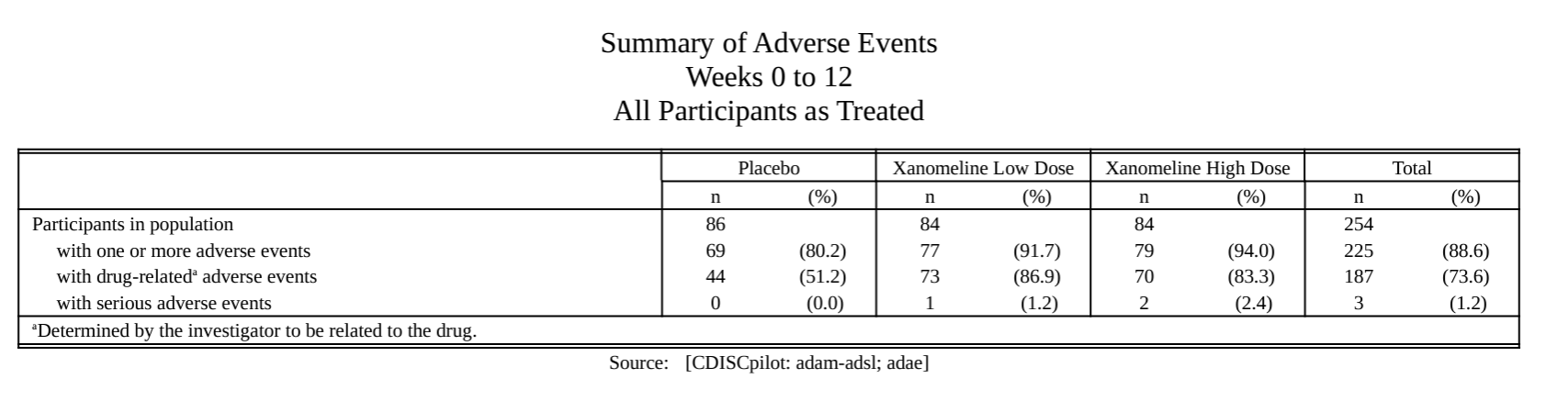
AE summary.
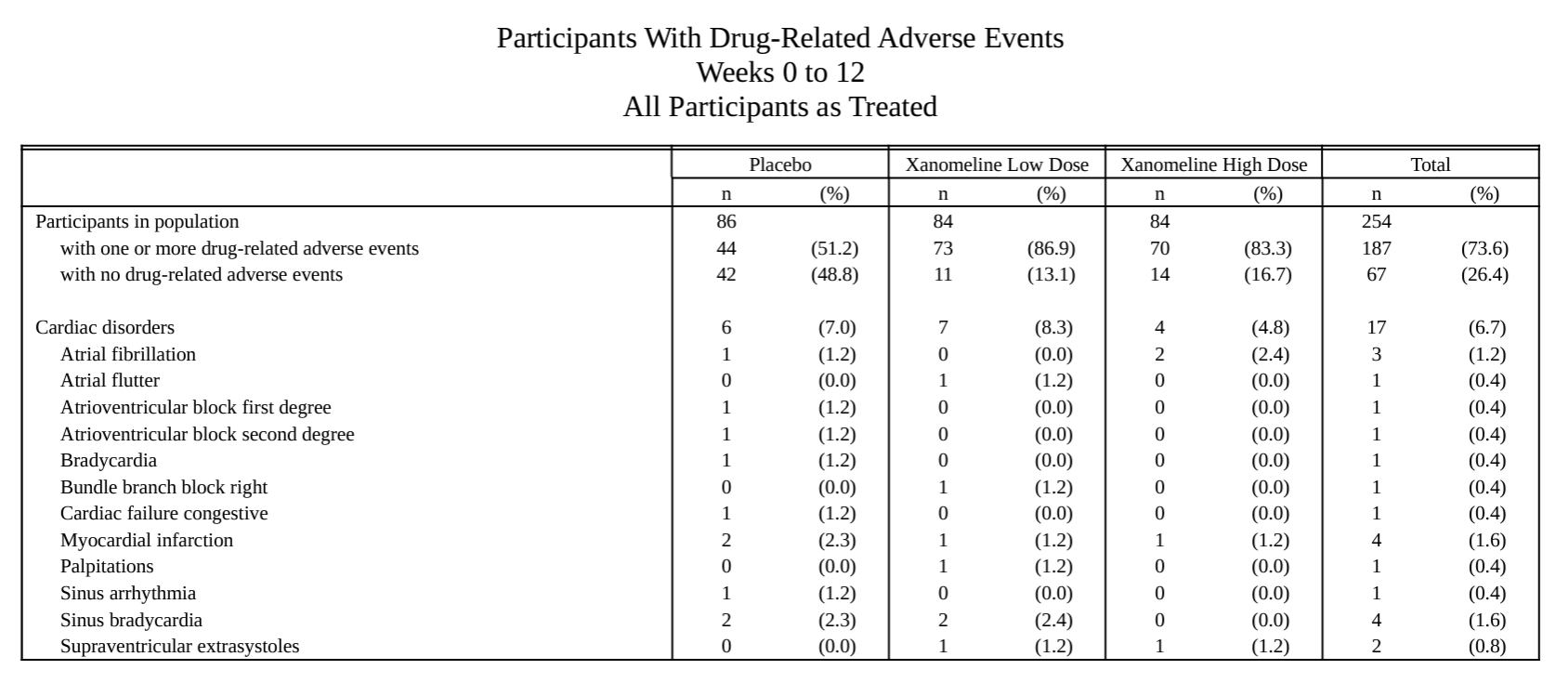
AE-specific table.
AE listing.
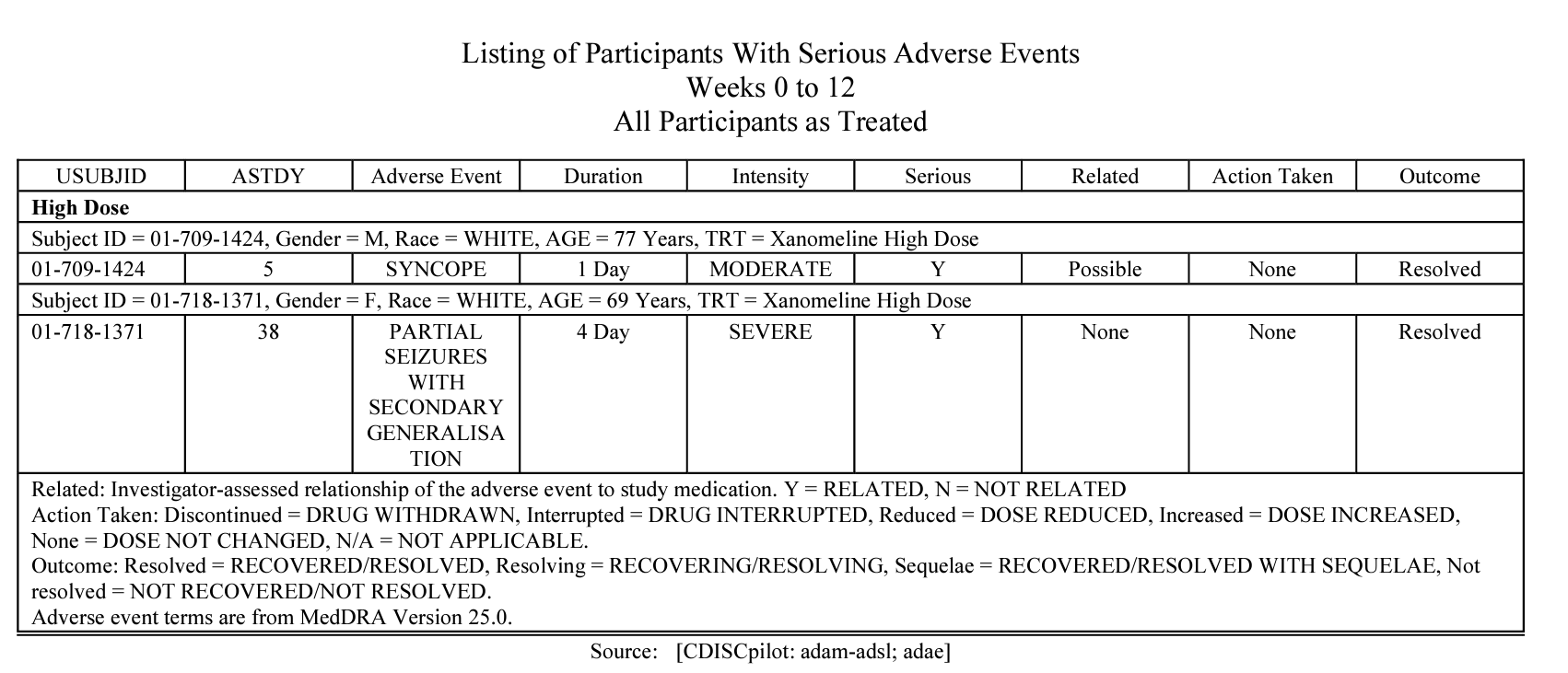
The shared metadata and consistent function interfaces support analysis
definition, development, validation, and final reporting.
## Highlighted features
- Reuse metadata definitions, such as the analysis population, across AE
analyses.
- Use consistent inputs and outputs across preparation, extension, formatting,
and reporting functions.
- Create mock tables from the planned output structure.
## Workflow
The overall workflow includes the following steps:
1. Define metadata with the [metalite](https://merck.github.io/metalite/) R
package. See the
[metalite tutorial](https://merck.github.io/metalite/articles/metalite.html)
for a complete example.
1. Prepare analysis data with a `prepare_*()` function.
1. Optionally add statistics with an `extend_*()` function.
1. Format the results with a `format_*()` function.
1. Create a table, listing, or figure (TLF) with a `tlf_*()` function.
The following example outlines the creation of an AE summary table.
### Step 1: Define metadata
```{r, eval = FALSE}
adsl <- forestly::forestly_adsl
adae <- forestly::forestly_adae
adsl$TRT01A <- factor(
adsl$TRT01A,
levels = c("Xanomeline Low Dose", "Placebo"),
labels = c("Low Dose", "Placebo")
)
adae$TRTA <- factor(
adae$TRTA,
levels = c("Xanomeline Low Dose", "Placebo"),
labels = c("Low Dose", "Placebo")
)
analysis_plan <- metalite::plan(
analysis = "ae_summary",
population = "apat",
observation = "wk12",
parameter = "any;rel;ser"
)
meta <- metalite::meta_adam(observation = adae, population = adsl) |>
metalite::define_plan(analysis_plan) |>
metalite::define_population(
name = "apat",
var = c(
"USUBJID", "SAFFL", "TRT01A", "TRTDUR",
"SITEID", "SEX", "RACE", "AGE"
),
group = "TRT01A",
subset = SAFFL == "Y",
label = "All Participants as Treated"
) |>
metalite::define_observation(
name = "wk12",
var = c(
"USUBJID", "SAFFL", "TRTA", "AEDECOD", "AEBODSYS", "AEREL",
"AESER", "AEOUT", "AEACN", "AESDTH", "ASTDT", "AENDT"
),
group = "TRTA",
subset = SAFFL == "Y",
label = "Weeks 0 to 12"
) |>
metalite::define_parameter(
name = "any",
term1 = "",
term2 = "",
var = "AEDECOD",
soc = "AEBODSYS",
label = "All AEs"
) |>
metalite::define_parameter(
name = "rel",
term1 = "Drug-Related",
term2 = "",
subset = AEREL %in% c("POSSIBLE", "PROBABLE"),
var = "AEDECOD",
soc = "AEBODSYS",
label = "Drug-related AEs"
) |>
metalite::define_parameter(
name = "ser",
term1 = "Serious",
term2 = "",
subset = AESER == "Y",
var = "AEDECOD",
soc = "AEBODSYS",
label = "Serious AEs"
) |>
metalite::define_analysis(
name = "ae_summary",
title = "Adverse Event Summary"
) |>
metalite::meta_build()
```
### Step 2: Prepare the analysis data
```{r, eval = FALSE}
x <- meta |> # Example AE data created using metalite
prepare_ae_summary(
population = "apat", # Select population by keywords
observation = "wk12", # Select observation by keywords
parameter = "any;rel;ser" # Select AE terms by keywords
)
```
### Step 3: Format the results
```{r, eval=FALSE}
x <- x |> format_ae_summary()
```
### Step 4: Create the table
```{r, eval=FALSE}
rtf_dir <- if (dir.exists("vignettes/rtf")) "vignettes/rtf" else "rtf"
rtf_file <- file.path(rtf_dir, "ae0summary1.rtf")
x |>
tlf_ae_summary(
source = "Source: [CDISCpilot: adam-adsl; adae]", # Define data source
analysis = "ae_summary", # Provide analysis type defined in meta$analysis
path_outtable = rtf_file # Define output
)
```
```{r download-rtf, results="asis", echo=FALSE}
cat(
"Generated RTF file: ae0summary1.rtf"
)
```
See the [package articles](https://merck.github.io/metalite.ae/articles/) for
complete workflows and additional examples.